Skip to content

Four plans, a free tier, and thirty days to decide

Invoice Crowd has a free plan and four paid plans, each paid plan with a 30-day trial and no card. The paid plans differ in how many customers, businesses and team members you carry, not in which features you are allowed to use, because accounting, recurring invoices, retainers and every invoice template are in all four.

  • Review current plan terms before signup
  • No credit card to start
  • Free forever plan as well
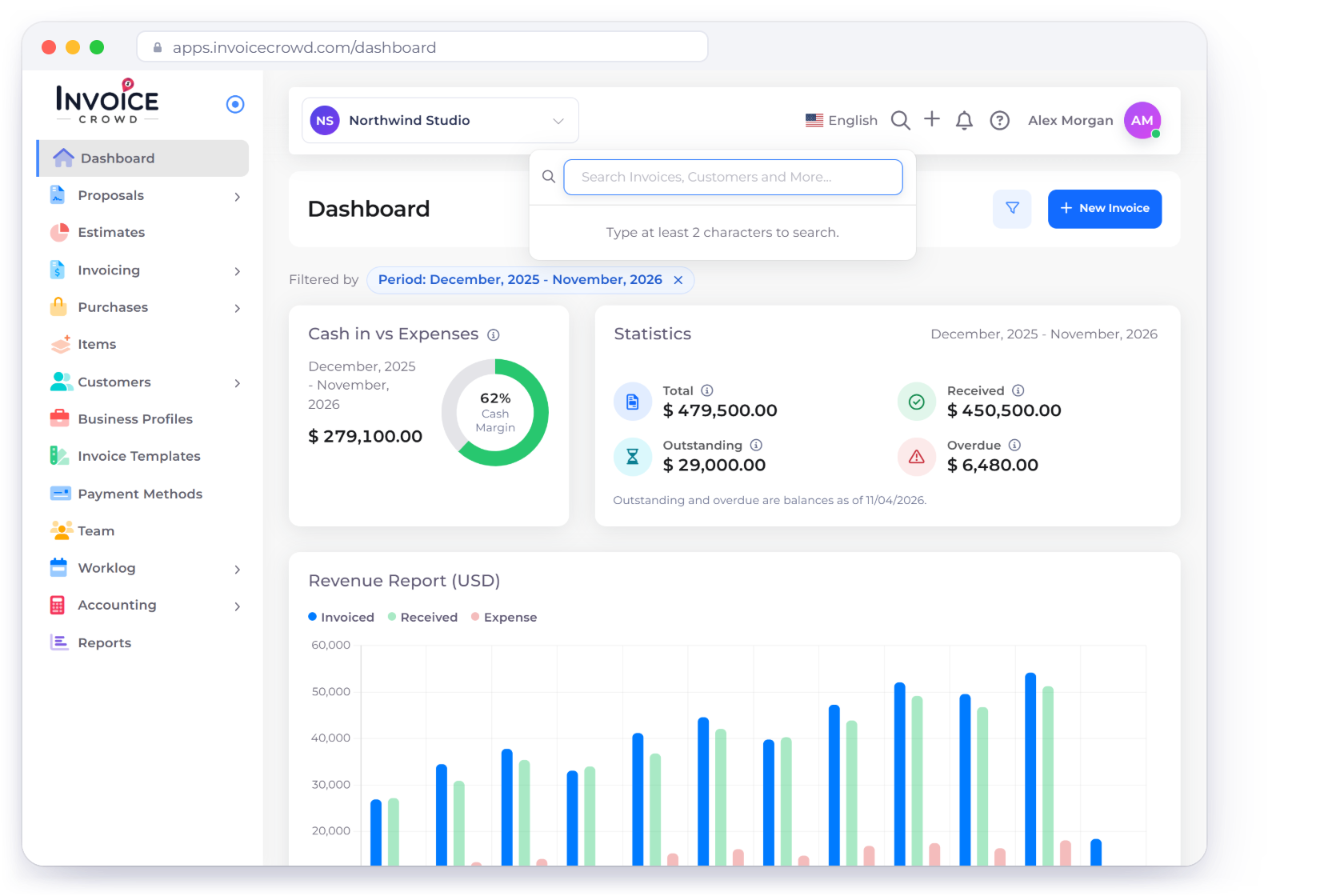
Invoice Crowd dashboard with a year of invoiced, received and expense totals, beside the TEAM plan at $18 a month billed yearly, a 30-day trial notice and business profile usage

Four plans

The plan is set by your numbers, not by your features

Yearly billing takes the monthly rate down. Each plan's proposal allowance resets every calendar month, on monthly or yearly billing and during the free trial. Both figures are on the card, so the choice is visible before you make it.

Billing period

Save up to 15%

  • SOLO

    One person, one business, a client list you can name from memory.

    $ 9 / month

    Billed $108 annually

    Start free trial

    What's included

    • 100 customer profiles
    • 1 business profile
    • 5 new proposals a month
    • Single user, team seats from TEAM
    • Unlimited recurring invoices
    • Estimates and the proposal system
    • Unlimited projects
    • Accounting, ledger and statements
    • Access to all invoice templates
    • 15 payment gateways, PayPal and Stripe included

    Add-ons

    • AI credits · $9.99 per 600
  • PRO

    A freelancer billing steadily, with a second business on the side.

    $ 13.75 / month

    Billed $165 annually

    Start free trial

    What's included

    • 500 customer profiles
    • 2 business profiles
    • 15 new proposals a month
    • Single user, team seats from TEAM
    • Unlimited recurring invoices
    • Estimates and the proposal system
    • Unlimited projects
    • Accounting, ledger and statements
    • Access to all invoice templates
    • 15 payment gateways, PayPal and Stripe included

    Add-ons

    • AI credits · $9.99 per 600
  • TEAM

    A small studio where more than one person raises the invoices.

    $ 18 / month

    Billed $216 annually

    Start free trial

    What's included

    • 1,000 customer profiles
    • 5 business profiles
    • 50 new proposals a month
    • 2 team members included
    • Unlimited recurring invoices
    • Estimates and the proposal system
    • Unlimited projects
    • Accounting, ledger and statements
    • Access to all invoice templates
    • 15 payment gateways, PayPal and Stripe included

    Add-ons

    • Extra team members · $5/mo each
    • AI credits · $9.99 per 600

There is also a free forever plan at no cost: unlimited invoices, one business profile, five customer profiles, two invoice templates and PayPal as the payment method. Recurring invoices, subscriptions and retainers, Worklog, accounting, purchases and expenses, the customer portal, the AI Assistant, Lock Transactions and every payment gateway other than PayPal need a paid plan.

In every plan

What the price actually covers

These are in all four paid plans. Moving up a tier raises the limits on customers, businesses and people rather than switching extra features on.

  • Invoice tracking

    Raise an invoice, send it, and watch it move from sent to viewed to paid.

  • Custom invoice templates

    Design your own invoices in the template builder: fonts, colors, shapes, logo size and columns, with document labels in eight languages. Monthly and yearly plans can also hide the Invoice Crowd branding on customer pages.

  • Reminders and late fees

    Chase overdue invoices on a schedule you set, and add one late fee the day after the due date if you switch late fees on.

  • Recurring invoices and retainers

    Bill a flat fee on a cycle and each period raises and sends its own invoice, or run a retainer with hours included each month.

  • Card payments

    Clients settle by card from the invoice itself through the gateway you connected, wherever they are reading it.

  • Payments in one place

    Money lands in your own account, each payment records against the invoice it settled, and Payments Received lists every receipt, advance and overpayment credit.

  • Saved items and services

    Keep the services you sell often and drop them onto a document instead of retyping the line.

  • GST and reports

    Turn GST on per business, then run the filing report alongside invoice, income and expense reports.

  • Multi-currency accounting

    Invoice in the currency a client works in while every statement still totals in your base currency.

  • Proposals and signatures

    Build a proposal from 40+ templates and take the client's signature in the browser, on any plan.

  • Split and part payments

    Take a deposit up front and let the balance settle in parts against the same invoice.

  • Projects and timesheet

    Unlimited projects on every paid plan, with hours logged in a weekly timesheet and each project showing its profit.

Customers who compared before they picked a plan

Reviews from Invoice Crowd customers, published as written and not edited for this page. Several of them weigh the cost against the tool they were paying for before, which is the question a pricing page asks.

Read all customer reviews

  • A Solid product with good support

    I’ve been using another well-established accounting software which has worked well but the Covid took a major toll on my business and I’ve needed to cut my costs which included looking at another accounting solution. After a little searching, I came across Invoice crowd, and again after performing a little due diligence, I could see that they were a relatively new company and from my experience sometimes this is not a bad thing. Anyway, I decided to purchase the Invoice crowd and give it a try and I was pleasantly surprised, and have now made the decision to transfer all my accounting requirements to Invoice crowd. I also recommend this product.
    Richard Tee Richard Tee Feb 14, 2022 via Trustpilot
  • Invoice system I’ve been looking for

    I’ve been looking for an easy to use Invoice System. We were previously using a different system that was much more expensive and required too many steps to add customers and create invoices. After looking at many different options I decided to give Invoice Crowd a try. Being able to quickly create reoccurring invoices is what sold me. The setup process was very easy and intuitive. Other things I like include the roadmap. What has already been added along with the plans for the future are very impressive. The developer appears to be very responsive to customers needs based on all of the questions asked and reviews.
    Chamaiporn Biedrzycki Chamaiporn Biedrzycki January 16, 2022 via Trustpilot
  • Made the switch to Invoicecrowd

    It’s saved my team and I alot of time. We receive payments faster and it takes less than a minute to set up all of our accounts. You can set recurring invoices, edit or pause them if needed, schedule out your start date, and customize the look/brand of the invoices. The stripe and paypal integration also allows you to get the funds deposited quickly. I’ve been using simpleinvoices, another similar platform for many years but it nevers gets updated and is getting quite buggy. I’m happy i made the switch to Invoicecrowd
    Will Will January 11, 2022 via Trustpilot
  • Invoice Crowd Review – Thumbs up from me!

    I spent a lot of time researching invoice software to replace my old system. I had the difficult task of finding the right product that was easy to use, not expensive, and had all the features I needed. I was impressed by how simple and professional Invoice Crowd looked and it really did meet my needs. It’s really amazing, it has changed the way my company manages it’s financials and I am proud to recommend this simple and user friendly tool to anyone who needs invoice software. It’s is the hub of my business. I use it to get paid faster, keep track of my money coming in and going out, and much more. It’s a great tool for any business owner!
    Andrew M. Andrew M. March 7, 2022 via Capterra
  • Simple, User-Friendly, Exactly What I Needed

    I recently started a consulting arm of my business and was looking for a simple, but robust invoicing software that didn’t overwhelm me. I searched and found Invoice Crowd, which has been the perfect solution. I was able to purchase Invoice Crowd, set up my business profile, add client profiles, integrate my payment options, add my own brand colors and logos, and create several invoices within minutes of joining. I’m pretty amazed at how easy they have made it. I researched many invoicing systems and this by far was exactly what I was looking for in order to get invoices out with a quick turnaround. I’d highly recommend it.
    Angie N. Angie N. September 13, 2022 via Capterra
  • Invoice Crowd has saved us money! We have been using IC for about 6 months now, and it has saved us such a large amount of money that we are now able to spend it on other things we need for our company, ncluding other licenses for needed software. The convenience is the key to this program’s success. We are now able to manage all of our companies from one, single dashboard, and even allow each to use different payment methods to collect funds. The developers and support have been very helpful, and they even added features my team and I requested. I am confident this will be our invoice solution for life, I am so thankful to have found them.
    David David

See what our other users say about us

Questions

Before you pick a plan

How does the free trial work?

Pick any paid plan and use it for 30 days without entering a card. Nothing is charged and there is no contract, so the trial ends when you decide, one way or the other. Support is available during the trial if you get stuck setting the account up.

What happens when the trial ends?

Your data is kept. Billing shows that the trial has ended and asks you to subscribe to the plan you were trying, or you can choose Continue on Free and keep working within the free plan's limits until you are ready.

Can I change plans later?

Yes, from Billing and Plan in your account menu, in either direction. There is no commitment and no notice period, so a busy quarter can run on BUSINESS and a quiet one on SOLO. Team seats come with the TEAM plan (two) and the BUSINESS plan (three).

Do I have to install anything on my computer?

No. Invoice Crowd runs in a browser, so there is nothing to download, patch or license per machine. Sign in from a desktop at the office or a phone on site and it is the same account, with the same data, on both.

Is my data safe?

The app runs behind SSL and your data is backed up automatically. Two-factor sign-in is available, and changing your password signs out your other sessions. Card payments go through the gateway you connect, such as PayPal or Stripe, and are handled under that provider's own security.

What support do I get on a paid plan?

The support team answers questions directly, the same way it does during the trial. Written documentation at doc.invoicecrowd.com covers setup and each module, and the public roadmap at plan.invoicecrowd.com shows what has already shipped and what is being built next.

What is in the free plan, and what needs a paid plan?

The free plan includes unlimited invoices and estimates, one business profile, five customer profiles, two invoice templates, three proposals, PayPal as the payment gateway and Payment Note for your own payment instructions. New recurring invoices, subscriptions and retainers need a paid plan, as do Worklog (projects and timesheets), the AI Assistant, Team, Lock Transactions, accounting (chart of accounts, journals, bank reconciliation and statements), bills, purchase orders, vendor credits, payments made, expenses, incomes, credit notes, payment links, the customer portal, Bank QR, Direct Pay Link and the other 14 gateways. Saving customized invoice designs and Link custom fields also need a paid plan. Recurring schedules you already run keep running, but customer subscriptions on Stripe, Razorpay, Square, GoCardless, PayFast or Airwallex are paused 30 days after an account moves to the free plan, and resume when you upgrade. The AI Assistant also needs AI credits, which are bought separately.

Start on the plan that fits this month

Thirty days on any paid plan, no card at signup, and a free tier underneath it if the timing turns out to be wrong.

  • free trial on all four plans
  • Change plans from Billing and Plan
  • Free forever plan if you need it